

The 2025 Editable Teacher Planner Is Here!
There’s something about a fresh planner that feels like a brand-new start.
A chance to breathe, to organize all the pieces floating around in your head, and to finally feel on top of everything again.
That’s why we’re so excited to share this year’s Editable Teacher Planner—your go-to tool for staying organized, focused, and energized all year long.
And the best part? It’s totally customizable to fit your unique teaching style.
Whether you like to plan by the week, by the day, or just need a place to track alllll the things, this planner has you covered.

What’s Inside the Free Version
When you download the free planner, you’ll get a thoughtfully designed set of tools to simplify your teacher life from day one:
✔️ Editable Lesson Planning Templates – Plan your week or month with ease.
✔️ Customizable Covers – Choose from 6 playful, professional designs.
✔️ Student Checklists – Track assignments, behavior, or progress.
✔️ Monthly Calendars – Keep important dates and deadlines in one place.
✔️ To-Do Lists and Notes Pages – Because you’ve got a lot going on.
Print it out or keep it digital—either way, it’s designed to help you stay focused and in control.

Want Even More Customization?
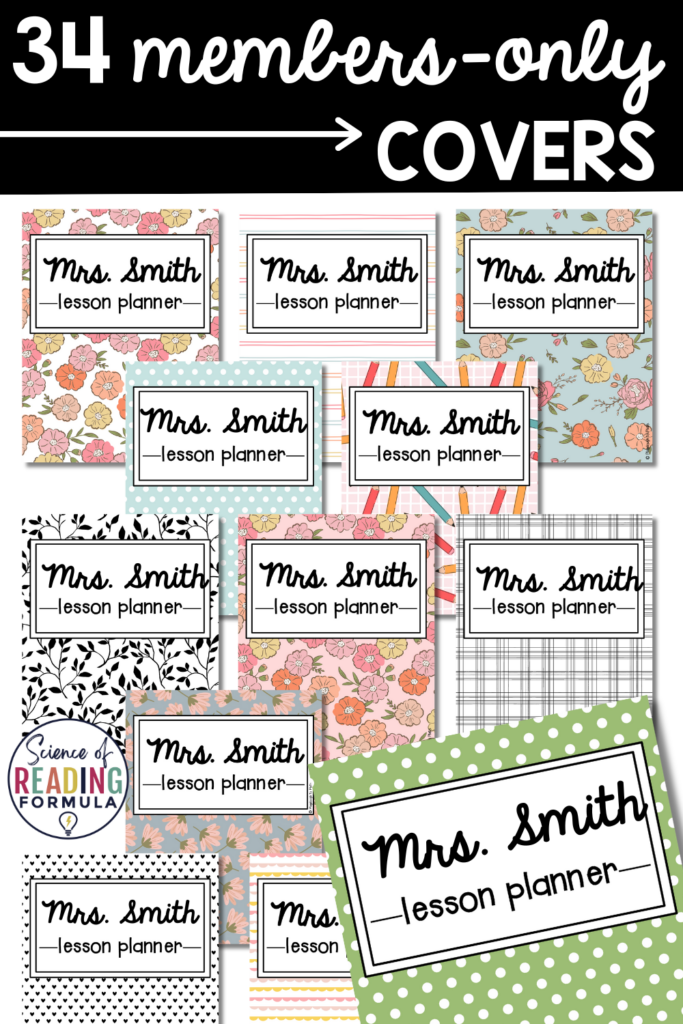
Our members-only version kicks it up a notch with 34 additional cover options (yep—40 total!). From bold and bright to calm and classic, there’s a style for everyone.
We created the expanded pack for teachers who love having everything just right. The fonts, the colors, the vibe—it’s all in the details.
And because it’s part of your Science of Reading Formula membership, you’ll also get:
✔️ Access to thousands of ready-to-use teaching tools
✔️ New resources added every single week
✔️ Easy-to-search library for planning fast
✔️ Time-saving strategies to make teaching more fun and less stressful
Grab Your Planner
Ready to download your planner and start mapping out the year? Click the big blue “DOWNLOAD HERE” button below to snag your brand new planner.
And if you’re a member, don’t forget to log in and download the exclusive full pack with all the extra covers and goodies waiting for you!
Not a member yet but want the full planner (and so much more)? Join right here!
Let’s make this your most organized, stress-free year yet. You’ve got this! 🙌




Those organizers look really great!!!
Thanks, Stephanie! I hope the organizers come in handy. 🙂
Hi Judy,
I’m happy to help! The lesson plan book is an email subscriber appreciation gift. To receive it, just follow our blog by email {it’s FREE!} and the planner will be sent directly to your email inbox. Here’s the page where you can sign up:
https://www.playdoughtoplato.com/follow-our-blog-by-email/
Enjoy!
-Malia
Thankyou so much for getting back to me quickly! I’m so glad I can use this plan book. It fits perfectly with having a handful of kids. The ability to add extra pages is wonderul:)
This blog has given me new motivation for homeschooling my LO.
Thank you for sharing all these great, detailed, and creative ideas! You have major talent!
Hi —
I have the lesson plan book and I am trying to figure out what font you used for it? Thanks!
Hi Lynn! I used Boogaloo and Reklame Script Regular (both are free from Font Squirrel). Enjoy!
Received!! thank you so much!!
You’re welcome, Yvonne!! Enjoy!
Hi Erica!
I’m happy to help! The January 2016- December 2016 calendars start on page 31 of the freebie. In case the copy you have still doesn’t match up for some reason, please feel free to email me at playdoughtoplato@gmail.com and I’ll send you the current version. 🙂
Warmly,
Malia
Do you have the lessons planners in french ?
Hi Noemie! The lesson planner is currently only available in English. 🙂
Malia
Perfect, thanks!
Thank you SO MUCH for these fantastic materials! I am a homeschool mom and I am using these to organize my planning binders for next year. I am really excited to find such a great resources.
Great question, Mary! Yes, the updated version is in the works so keep an eye on your inbox – I’ll notify free email subscribers first. 🙂
I cant wait for an update!!! I love this and use it in my classroom!
Wow! What a freebie! This will come in very handy! Thanks so much for sharing!
This is an awesome freebie!!! Thanks so much for sharing your expertise and amazing gift with us. Abundant blessings
Thanks so much for the Lesson Plan Binder. It is great. I would love to see the cover page (with the apple) as a Lesson Plan cover page too. Is that possible?
Thank you so much! I got this last year and loved it so much! Recently, I have spent days looking for it again because I couldn’t remember where I bought it. Can’t believe it is free! Perfect and life-saving resource!
Hi Britthany! You’ll need to grab the free font bundle here:
https://www.teacherspayteachers.com/Product/ALL-Kimberly-Geswein-Fonts-in-One-Big-Download-Personal-Use-537780
Hope that does the trick for you!
Malia
Hi! I love this planner! I downloaded it in a PDF format but I cant figure out how to edit it to type in or or replace all the “your name”‘s with my name or the add in my daily schedule. Can you tell me how to do that? Thanks!
I love the planner
What an amazing resources for free!! I am always searching for the BEST teacher planner and have decided that printing my own would be best. Many of these pages will be very helpful, thank you!
Hi Jaya,
I’m happy to help! All of our printables (including the planner) are email subscriber freebies so just click “confirm” on that Active Campaign page and the link to the planner will land in your inbox.
Hope that helps!
Malia
I LOVE the look of your organizers!
Thank you so much Joy! I personally use the yellow one and LOVE it too!
Have a wonderful day,
Kimberleigh
It would be very helpful to my kids!
I want to try and see what will change~
I love the colours,
Thanks, Petro!
I just love colors too, its one of the things I LOVE about our planner- so many fun choices to choose from!
Warmly,
Kimberleigh // Happiness Ambassador
Hello:)
I love your planner, but I can’t seem to get it to work. I downloaded the fonts and the free planner. However, when I go to type…there is no grey box. If you could help me, I would greatly appreciate it. Thanks so much!
Hello Nicole,
Thanks for reaching out, I am happy to help.
Please make sure that you have the most recent version of Adobe Reader Other downloaded onto your computer.
It is free or available here: https://get.adobe.com/reader/otherversions/
I hope this helps!
Warmly,
Kimberleigh // Happiness Ambassador
Thank you so much! That worked! It is exactly what I need:) Thank you for all the hard work that went into this planner!
Hooray Nicole!
I am so glad it all worked out.
Happy planning!
Kimberleigh
I love the planner, just what I was looking for. Is there a way to edit the dates on the calendar though?
Hello,
Thank you so much for reaching out and for the kind words.
Currently, the calendar runs through next Christmas. This summer we will update it for another 18 months out.
I hope this helps!
Warmly,
Kimberleigh
Just loved this! Thanka for making my live easier!
Hooray Elizabeth!
We love to hear that! I hope you find hours of inspiration and fun for your classroom!
Happy planning!
Warmly,
Kimberleigh
OMG as a new, young teacher, who just finished 1st year of teaching, this is so great and useful thing! I realised how much I needed this kind of organizer… thank you so much!!
Hooray Tamara.
I am so delighted that you were able to find the perfect planner!
Happy planning!
Warmly,
Kimberleigh
Thank you for sharing, it’s amazing!
Thanks, Rebecca- happy planning!
Warmly,
Kimberleigh
I had no problems downloading. Mainly I want to say THANK YOU, and shared!
Hooray Melissa!
Thank you so much for your kind words.
Happy planning!
Warmly,
Kimberleigh
Nice one!
Thanks! Happy planning!
Thank you!
Welcome! Happy planning.
Warmly,
Kimberleigh
Thank you, thank you, thank you! This is awesome and exactly what I needed!!! Thank you!
NEVERMIND!! I found your link above for Download and Printing help and your Youtube video told me everything I needed to know!! THANK YOU
Hooray! I am so glad that it all worked out.
Please let me know if I can be of any further help.
Warmly,
Kimberleigh // Community Manager
Hi Ashley,
No need to purchase an additional Adobe, just make sure you have the correct one by going to https://get.adobe.com/reader/otherversions/ Make sure to delete or disable all other versions of readers on your computer, as different versions will attempt to open the planner, but will not be successful.
I hope this helps!
Warmly,
I downloaded both the planner and font pack. When I type into planner its a standard small font. I can’t see how to change it.
Hi Kerr,
To edit successfully, please make sure you have the most recent version of Adobe Reader Other downloaded and open on your computer, it is free and available HERE.
I keep trying to sign up to be able to download this lesson planner, and it just keeps thinking and won’t let me do anything.
Hi Stasia,
Thanks for reaching out. Make sure to check out our troubleshooting video HERE for downloading tips.
I am not having any trouble downloading anything else, but this planner will not go past the “submitting” screen after I type in my info. I can then go to another window and download other items just fine. What should I do to troubleshoot this for the planner?
Hi Alexis,
Thank you so much for reaching out, great question.
Please make sure to have the most recent version of Adobe Reader Other and the popups allowed from our site. This will ensure that the freebie can load properly.
I hope this helps!
Warmly,
This is a blessing. I am an English teacher at Puerto Rico and really loved the format. Thanks for this great gift!!
Hooray Bernadette! I am so glad that you found a planner that will work for you.
Happy planning!
Hi,
I love your planner and I just downloaded copy of your new version. Love the new cover designs. However, I can’t seem to edit the pages. I didn’t have a problem with the last one. I can’t figure out how to make the font smaller so it will fit on the cover page. It keeps telling me the document is locked. I also can’t add text boxes to type in the date. Any suggestions? I did download the new version of Adobe, but it keeps telling me this is a secure document.
Thank you,
I also have the same problem. It keeps asking me for the password in order to edit. I didn’t have a problem last year but I do have it this year. I’ve downloaded the apps and the new version of Adobe but it still keeps asking for a password. Do you have a password I can enter in order to edit? Thanks so much 🙂
Hi Malia,
I clicked the link for the font, and it took me to the bundle with 25 pages of fonts. I don’t want to download all of them, and I can’t see in your post anywhere which fonts you used. Could you please tell me which ones I need to download? Thanks!
Hi K,
Great question!
The specific font we use is Always a Good Time.
I hope this helps!
Kimberleigh
?Thank you
Welcome, happy planning!
Thank you for this super cute planner!
Is there a way to edit the banners and “week of” part? Instead of a weekly lesson plan, I want to use it like a double page monthly calendar.
Thanks~
Hi K,
Thanks for the kind words!
At this time, it is not editable, but we will keep it in mind for the future.
Warmly,
Kimberleigh
Hi there,
I am trying to download the free teacher planner however, I am having a tough time. I have put my first name and email in and it keeps saying “loading…”. I let it load for a good 15 minutes but still nothing.
I figured it was something with my broswer and so I refreshed the page and tried again, this time with a different email address and the same thing is happening :S It has been stuck on ‘loading…” for the past half hour. I know it hasn’t frozen because the little dots are still moving.
I even downloaded the text document you recommended. Is there something I am doing wrong?
I love the look of this and would LOVE to use it for my first long range LTO 🙂
Hi Kimberly,
Thanks for reaching out, I am happy to help.
It sounds like you there may be blocks on your computer that are preventing a download.
Please check your firewall and the settings on your browser to ensure that popups and downloads from our site are allowed.
I hope this helps!
Warmly,
Kimberleigh
I have restarted my laptop and I still cannot find where the option to change the font is on the PDF document. The font that says ‘your name’ is in this beautiful cursive font and then when I click to change it to my name it turns into this… less-beautiful blocky font.
What do I have to do?
Hi Kimberly,
Thanks for reaching out, great question.
Please make sure you have the most recent version of Adobe Reader Other updated and installed on your computer.
It is free and available HERE.
I hope this helps!
Warmly,
Kimberleigh // Happiness Ambassador
Hi,
I was wondering if you have a way to add more students names to a page of the checklists. I have a class of 20 and would love for all the names to be on the same sheet for easy reference.
Hi Jessica,
Thanks for reaching out. Great question!
At this time, we don’t have the editability set up to do that, but we will keep it in mind for the future.
Warmly,
Kimberleigh // Happiness Ambassador
Hi I downloaded all the fonts but every time I try typing in the editable areas of the planner it changes to Times New Roman.
Hi,
Thanks for reaching out. Please check out our troubleshooting video HERE for help. If you’re still having trouble you can email us at hello@www.playdoughtoplato.com
Warmly,
Ashley // Happiness Ambassador
Hi,
I cannot download it. I press Submit, but it keeps loading. and my internet connection is good.
Could you help me please?
Hi,
Thanks for reaching out, please check out our troubleshooting video HERE for help.
You need to make sure that you are allowing pop ups from our website and that you have downloaded the most recent version of Adobe Reader.
Warmly,
Ashley // Happiness Ambassador
I was unable to type anything on the planner after downloading it because I got a popup that said it was password protected. What is the password I should use?
Hi River,
The planner should not be password protected. Please be sure you have the most recent version of Adobe Reader in order to edit.
Also, be sure you have saved it to your computer before attempting to edit.
Let me know if I can be of any further help.
Warmly,
Ashley // Happiness Ambassador
Thank you so much for all your hard work and generosity!
Thank you for your kind words Rimma!
It is our pleasure!
Have a beautiful day!
Warmly,
Ashley // Happiness Ambassador
Thank you for your insight into your planning designs. Greatly appreciated. Just need ideas to start.
Wonderful! We’re so glad you enjoyed it!
Warmly,
Ashley // Happiness Ambassador
I would also like to thank you for your kindness to create this amazing planner for teachers.
It’s exactly what I want and it would have taken me far too long to create myself, and not with the wonderful colours, fonts and innovate designs that you have created.
Thank you for being so generous by providing this for free.
Kindest Regards always,
Rachel.
Thank you so much for your kind words Rachel!
We truly consider it a privilege to support teachers!
Have a lovely day!
Warmly,
Ashley // Happiness Ambassador
Thank you. I am so grateful for this colourful planner. As a new teacher I’ve been overwhelmed with all the fancy (OTT) planners until I saw this one!! Love it, and know it will make a huge difference to my planning and organising my new class.
Wonderful, Shelly!
We’re so glad you like it! Enjoy!
Warmly,
Ashley // Happiness Ambassador
It looks so beautiful, yet I have problems in downloading the binder. Can you please send it to my E-mail please.
Hibakhalaf@hotmail.com
Sincerely,
Miss Hiba
Hi Hiba,
Thanks for reaching out. I’m sorry you’re having trouble downloading. We never want that. Please check out our troubleshooting video HERE for help. You’ll also want to make sure you have the most recent version of Adobe Reader Other and that you’re allowing pop ups from our site. I hope that helps!
Warmly,
Ashley // Happiness Ambassador
This is amazing, very excited to get working on this! Do you have another version coming out with the 2019-20 calendar at the end?
Hi Courtney,
So glad you like it! Yes, we will be updating the planner in the coming months so you’ll be set for next year!
Warmly,
Ashley // Happiness Ambassador
I have adjusted my settings to download this and cannot get it to work. Usually, things download with no issue. I watched the tutorial about downloading help, but I still cannot get the file to open. When I enter my name and email address, it just says :submitting”, but goes no further. Any suggestions?
Susan
Hi Susan,
I’m so sorry it’s still giving you trouble.
Please email me at hello@www.playdoughtoplato.com and we’ll get it resolved for you.
Warmly,
Ashley // Happiness Ambassador
Thank you so much for your hard work on this and for your generosity. I am a new teacher and I love your resources and ideas.
You are very welcome!
We truly consider it a privilege to give back to teachers!
Warmly,
Ashley // Happiness Ambassador
Will you by chance be updating this for the 2019-2020 school year? I love it, and appreciate your hard work on it to help others!
Hi Deanna,
Yes, she will be updating it for the 2019-2020 school year.
You can look for the update at the end of May or the beginning of June.
Warmly,
Ashley // Happiness Ambassador
I have appreciated so many of your products, and my first graders have benefitted from them as well. I recently downloaded your lesson planner, and wanted you to know (I’m sorry, I couldn’t find another way to notify you) that the dates are off for the year 2019. For example, today is Saturday June 8th, but your calendar shows June 8th on a Friday. Again, I appreciate and will continue to happily use your products. Thank you! -Emily
Hi Emily,
Thanks for reaching out. I double checked the calendar, and the dates appear to be correct.
However, you will notice the format is a little different. The week starts with Monday and ends with Saturday and Sunday. So, on a traditional calendar the space may look like it’s Friday, but it is actually Saturday on the calendar. I hope that makes sense.
If you have any other questions, you can email me at hello@www.playdoughtoplato.com.
Warmly,
Ashley // Happiness Ambassador
Hi! First off, thanks so much for this! It’s absolutely wonderful! I successfully download the file but can’t seem to edit it. Is there another step I need to do in order to edit the file? Thanks!
Hi Dani,
We’re so glad you’re enjoying the free teacher planner.
In order to edit the file, you do have to open it in Adobe Reader
If you are still having trouble editing, please email me at hello@www.playdoughtoplato.com
Warmly,
Ashley // Happiness Ambassador
Hey Ashley! This planner is EXACTLY what I was looking for! Can’t wait to get organized for the year with this awesome tool. Thank you a million times over!
You are very welcome, Allie!
We are thrilled you’re loving it!
Warmly,
Ashley // Happiness Ambassador
This is sooo wonderful of you to share!!!! I love it! Thank-you for sharing your creativity and organizational skills!
You are very welcome, Amy!
We’re thrilled you love it. We consider it such privilege to give back to teachers!
Warmly,
Ashley // Happiness Ambassador
Hi Ashley!
Thank you for sharing this amazing and well-organized planner. This is what I was looking for! I can’t wait until September to start using it.
You are amazing! 🙂
Greetings,
Frosina
You are very welcome!
We truly consider it a privilege to give back and support teachers!
Hope you love it!
Warmly,
Ashley // Happiness Ambassador
Thank you so much for all the work you have done to help teachers.
When I try to edit it it tells me I need a password.. where do I find that?
Thanks so much
Dorothy
Hi Dorothy,
Thank you so much for reaching out. You shouldn’t need a password to edit the Free Teacher Planner.
Please make sure you have the most recent version of Adobe Reader Other, it is free and is the only reader that will ensure that our products and freebies download, can be edited, and print correctly.
You also want to be sure that you are working with the file that has been downloaded and saved to your computer.
Once you have downloaded the KG Fonts suggested in the pack, I suggest you close the file and open a new version of the file in Adobe.
If that still doesn’t work, you can email me at hello@www.playdoughtoplato.com
Warmly,
Ashley // Happiness Ambassador
Hello.
I LOVE this planner, but to be able to print it out in color I need to send it to my school secretary. Is there anyway I can send the already edited one to get it printed out in color?
Thanks!
Hi Alia,
Thanks for reaching out.
Yes! I’d suggest making the changes to your editable file, then save that file under a different name.
When you open the new file, the changes should be there. You should be able to send that file to your secretary to print.
If you have any other questions, you can email me at hello@www.playdoughtoplato.com
Warmly,
Ashley // Happiness Ambassador
Wow! Just thank you! This is fantastic, and I know that I will be able to use many of these pages for my teacher planner.
You are very welcome, Angela!
Hope you enjoy!
Warmly,
Ashley // Happiness Ambassador
I used your planner last year and love the editable format. I was wondering if you are planning to provide 2020 calendars for this school year?
Hi Pam!
Yes! The planner has been updated for the 2019-2020 school year.
You can download the new version at the end of this post.
If you have any other questions about the planner, you can email me at hello@www.playdoughtoplato.com
Warmly,
Ashley // Happiness Ambassador
Thank you!
Hi, I love this planner! Do you have the calendar months for January through June 2020?
Hi Elizabeth,
Yes, the newest updated includes calendars through June of 2020.
You can download the update using the link in this post.
Warmly,
Ashley // Happiness Ambassador
I can’t seem to edit the file. Do you pay for adobe or use a specific download?
Hi Steff,
I am sorry you are having trouble editing. We never want that.
Here are a few tips:
Please make sure you have the most recent version of Adobe Reader, it is free and is the only reader that will ensure that our products and freebies download, can be edited, and print correctly.
You also want to be sure that you are working with the file that has been downloaded and saved to your computer – not the initial “preview file” that pops up. We often have customers trying to edit that file and it doesn’t work the same as Adobe Reader. You will need to edit on a laptop or desktop and not a mobile device.
If you’re still having problems, you can email me at hello@www.playdoughtoplato.com
Warmly,
Ashley // Happiness Ambassador
Hi Ashley
Thanks so much for this awesome planner – it’s so generous of you to offer it as a free download.
I do have a problem with the editing though. I have downloaded the KG Fonts pack and I can edit the name on the folder cover, but it does not give me the option to change the font or to make it smaller. I cannot get half my name on it as the font is way too big and with Ilse, the capital I (i) looks like a small “l”, so it just looks like two “L”s next to each other. 🙂
How can I change the font type or size please?
Thanks, Ilse
Hi Ilse,
Thanks for reaching out. Please check to be sure you are editing in Adobe Reader, and are editing on a desktop or laptop. It does not work the same on a mobile device. If you’re in Adobe, the font should automatically adjust to fit.
If you’re still having problems you can email me at hello@www.playdoughtoplato.com
Warmly,
Ashley // Happiness Ambassador
This is great! Can you tell me the name of the font used for the areas you can edit? I downloaded the font pack and I’d like to add some pages that are a little more custom and that would save me looking through all the fonts!! Thank you!
I found the font right after I submitted my comment!
Okay, perfect!
Hope you enjoy 🙂
Warmly,
Ashley // Happiness Ambassador
I absolutely LOVE this planner. We are getting ready to wrap up the 19-20 school year and was wondering if you will be updating for 20-21 year so I don’t have to go looking again.
Hi Allison,
Yes! Malia usually updates it in June 🙂
Warmly,
Ashley // Happiness Ambassador
Is it too soon to ask for 20-21 year update? hahaha I’m an administrator and I want to give it to my team and I need to start printing it, pretty please?
Hi Alejandra,
It is on Malia’s to-do list, but we’ve been working hard to get resources to teachers as quickly as possible during this time, so some projects have been put on hold. It will be coming soon though!
Warmly,
Ashley // Happiness Ambassador
Hi Alejandra,
Actually, Malia just finished the updates today.
You can download the 20-21 version now!
Enjoy!
Warmly,
Ashley // Happiness Ambassador
Hi!
It’s an awesome idea. Thank you for sharing!
I have a problem: I cannot download it. I click on download but nothing happens… I don’t know what to do and I really want this great planner.
Can you help me? Thank you!
Lourdes
Hi Lourdes,
I just emailed you a few minutes ago 🙂
Warmly,
Ashley // Happiness Ambassador
Hi, I seem to have the same problem. What am I doing wrong? Please help me! Thanks!
Hi Julia,
Thanks for reaching out. I’m sorry you’re having trouble downloading. We never want that.
Please check to be sure you’ve enabled pop-ups from our site. Even if you’ve been able to download before, the site was recently updated and you may need to do so again. We also recommend using the Chrome browser. For instructions on how to enable pop ups in Chrome, you can check out THIS ARTICLE.
You can also check out our troubleshooting video HERE for help. If you still can’t get it to work, you can email me at hello@www.playdoughtoplato.com and I will get it to you.
Warmly,
Ashley // Happiness Ambassador
thanks
You are very welcome, Paula!
Warmly,
Ashley // Happiness Ambassador
Is there a way for next year, the student checklists can have at least 20 on a page? I LOVE this planner and even print multiple copies for different parts of my life. I have been using the components and features for at least 3 years now.
So glad you enjoy it Sarah!
I’ll pass on the request.
Warmly,
Ashley // Happiness Ambassador
Hi,
I really like the look of the planner you made. However I cant download it. Please help!
Hi Paige,
Thanks for reaching out. I’m sorry you’re having trouble downloading. We never want that.
Please check to be sure you’ve enabled pop-ups from our site. Even if you’ve been able to download before, the site was recently updated and you may need to do so again. We also recommend using the Chrome browser. For instructions on how to enable pop ups in Chrome, you can check out THIS ARTICLE.
You can also check out our troubleshooting video HERE for help. If you still can’t get it to work, you can email me at hello@www.playdoughtoplato.com and I will get it to you.
Warmly,
Ashley // Happiness Ambassador
Hello, I like your plan book pages. I am going back into the classroom after 10 years and was looking for one and yours in perfect. Will you be updating the calendar pages for the 2020-21 school year? Thank you! 🙂
Hi Loralee,
Congratulations on returning to the classroom.
Yes! The planner will be updated in the next month or so.
Warmly,
Ashley // Happiness Ambassador
This is very nice, but I like the colored planner better. Are there any way I can change the color?
Hi Karen,
The color option is still available, but you can’t change the colors.
Warmly,
Ashley // Happiness Ambassador
How can I make the font smaller on the weekly lesson plan pages?
Hi Karen,
First, please be sure that you are editing the planner using Adobe. It is the the only reader that will ensure that our products and freebies download and print correctly.
The font size should automatically reduce to fit the space.
Please keep in mind some sections of the planner are editable, while others are not.
If you have any other questions, feel free to email me at hello@www.playdoughtoplato.com
Warmly,
Ashley // Happiness Ambassador
Your color coded 2019-2020 teacher planner is awesome. Thank you for the free planner it helped out tremendously.
You are very welcome, Karen!
So glad you love it!
Warmly,
Ashley // Happiness Ambassador
I am able to download the document fine but I am unable to edit the document – when I attempt to it asks for a password.
Hi Rebecca,
I’m sorry you’re having trouble editing.
First, please be sure you are trying to edit the document in Adobe. It is the only program that ensures our products can be downloaded, edited, and printed correctly.
Also, please check that you are working with the file that has been downloaded and saved to your computer – not just the preview file.
If you still can’t get it to work, please email me at hello@www.playdoughtoplato.com
Warmly,
Ashley // Happiness Ambassador
Hi,
Thanks for the planner! I really like it! I’m a first year teacher and I’ve been looking for something to use.
The colors are fabulous!
I’ve downloaded the file, and the fonts, but every time I try to type my name on the cover, the font doesn’t match at all. Everything is off! I can’t get anything to change. Suggestions?
Thanks!
Hi Suzanne,
We’re thrilled that you love the planner.
To ensure you can enter your name with the correct font, please check to be sure you are editing the file in Adobe.
If you still can’t get it to work, you can email me at hello@www.playdoughtoplato.com
Warmly,
Ashley // Happiness Ambassador
Thank for the planner it helps me a lot. i really like it
You are very welcome!
Warmly,
Ashley // Happiness Ambassador
Hello! I found the free planner last night and after downloading it, went to bed. I have had no wifi all day, and now, when I can finally get on, I cannot find it anywhere. It’s like it never existed. Is it possible to have it resent or re-download it?
Just emailed you Shannon 🙂
Let me know if I can be of any further help!
Warmly,
Ashley // Happiness Ambassador, Playdough to Plato/The STEM Laboratory
I love this – thank you for making it available! In your description, you say there are pages for up to 8 subjects but the download only has templates for 4 or 5; is there another file that has the additional templates? Also, is there a way to type titles for each subject on the left hand side of the subjects?
Hi Genevieve,
Thanks for reaching out.
Sorry about that. When we updated the file for this year, we modified the subject spaces. However, Malia just updated the file to include the 8-subject planning page. You can grab the updated file by clicking that download here button again.
Unfortunately, there’s not a way to add editable subject boxes on the left hand side because the text would need to be horizontal and we can’t flip the text boxes in Adobe. 🙁
Warmly,
Ashley // Happiness Ambassador
Thank you so much!
You are very welcome 🙂
Warmly,
Ashley // Happiness Ambassador
Your planner is great!! I have 22 students in my class though and there are only spaces for 16. I was just wondering how do I might get another page for additional students?
Great question, Ruth-Lynne! The easiest work around is to print off two sheets – they can even be front to back. Your first 16 students will go on the first page and your last 6 will land on the second page. I hope that helps! 🙂
Hello! I just wanted to thank you for making this Lesson Planner free and available. I am feeling a bit better about heading into the new year now. Thank you, thank you, thank you!
YAY!! I am SO HAPPY to hear that the lesson planner is helping you feel more optimistic about this year. I know there is still a lot of uncertainty about it will look like, but please know that I’ll be cheering you on every step of the way. I’m here for you!
Hello!! I love your planner! This would be my third year using it. For some reason i don’t have the colorful months and weekly plan options. Is black and white all that you are offering this year?
Thanks. Very helpful. Makes my job a lot easier.
yes. ive downloaded the planner but its asking for a password to edit on adobe.
Hi, I’ve downloaded but unable to edit. Which software do we use please?
Thank you!
Hi Isabella! You’ll be able to edit the teacher planner with Adobe PDF. 🙂
Hey I downloaded your free planner but it’s asking for a password to edit it.
Hi Jennifer,
I’m happy to help! Adobe recently updated their PDF reader so let’s go step-by-step:
1. Make sure that you have the most current version of Adobe Reader. It’s available for FREE here:
http://get.adobe.com/reader/otherversions/
2. Open your file finder and right click (or double click) on the file in your download folder.
3. Choose OPEN WITH –> ADOBE READER.
4. You may be prompted to choose Adobe Reader as your PDF reader in the future. To avoid problems in the future, click YES.
5. Edit the file and click “save”.
Fingers crossed that does the trick!
If you’re still having difficulty, send my customer service assistant, Lauren, a message at hello@www.playdoughtoplato.com and we’ll try a Plan B. 🙂
Malia
I can’t get the planner to download
Hi Kristal, I just double checked the download button and it’s working on my end. What internet browser are you using? Sometimes it helps to open up Google Chrome. Fingers crossed that does the trick!
Malia,
I looked at the calendar incorrectly. SO very sorry for bringing this up. It is such a wonderful tool to have available to us. Remove my email if you can so it doesn’t mess anybody up with my incorrect statement.
So sorry.
Hi Malia,
Thank you for sharing your hard work with us! This will get me started off on the right foot. I can’t find the 6-8 subject weekly lesson plans on the download. It shows 4 and 5 subject ones. Am I missing it somewhere?
Sorry to bother you but thank you in advance!
Same. I only see the 4 and 5 subject weekly plans. I need more squares. 🙂
Thank you very much for the lesson planner!! It is a definite way to help with my organization skills 🙂
Hello! Thank you so much! I cannot find the 6-8 subject planning pages. Only 4 & 5 are showing up? Ideas?
BIG HUG. It really helps a lot. I LOVE YOU SO MUCH. Will treasure it and be an even better teacher this year.
I cannot download the file. I checked my Adobe Acrobat and it is the latest update. I also use Chrome as my browser. I get this message box.
Error
Failed to load PDF document.
Then it has a Reload button in the bottom right corner. I click the Reload button and it still doesn’t do anything.
Thank you for providing this FREE resource! I’m sure I’ll love it when I can access it.
🙂
Happened to me too. Chrome is the issue i found out. You need to use a different browser. Chrome for some reason is blocking download links.
Hi,
I have the planner
, I just need the updated calendars please!
Thank you!
I downloaded but it it says I need a password to edit it.
Good evening,
I am trying to download your planner but it doesn’t work. It asks for my email which I keep on giving but still!
The 8 subject day section is gone 🙁
Hi, thanks for this great resource. However, when I downloaded it, it came as a PDF. It’s not letting me edit it. How can I download the editable version please?
you need to scroll further down and you will find the parts that are editable
That still did not work for me, I am unable to edit the doc.
Can you please tell me which fonts were used for this planner? I downloaded the free font bundle but there are SO many fonts! I’m not sure which ones to “install.”
Thank You
I purchased your states of matter but can’t find it in my downloads!
The calendars do not have the correct dates.
Nevermind, I feel silly now.
Hi there! Can you send Kaylee an email over at hello@www.playdoughtoplato.com, she can help out with that!
Thanks a bunch!
Hi there!
I downloaded the Teacher Planner but the option of 8 subjects wasn’t in it. Is it possible to get that one?
Thanks for this lovely planner, I love it! 🙂
When will the 2022-2023 be posted?
Hi there! I hope you were able to download your copy of the 22-23 planner!
Can’t wait for the 22-23 planner to get ready for a new school year
? Fingers crossed you were able to snag your copy!
The file will not load for the 2022-2023 planner. I have used your planner for the past few years….love it!!! Maybe the file could be sent to my email.
Hi Melody! Can you send me an email over at hello@www.playdoughtoplato.com and we will get you the planner right away!
Looks great.
Question is your Plato pack mostly for K, 1,2nd? Or what about other grades?
Hi there! Yes, most of our content is for primary ages. There are a lot of editable resources that teachers have used for other grade levels. What grade do you teach?
This is great
Help! I downloaded the editable teacher planner but it won’t let me open in in anything other than preview. Can you help?
I am so grateful for the planner, however I cannot get a link to pop up to open it. I have clicked on the blue “download here” banner and nothing happens.
I used your planner last year and loved it, but I cannot find where to actually download the 2022-2023 planner?
Hi, will there be a 2023-2024 planner?
Sorry, just saw I made a istake with the year!
I love your work. How can I download it?
Hi Rita! You’ll want to click the blue DOWNLOAD button just above these comments. It will pop-up with a new page that you can enter your information and download the planner. ? Fingers crossed that helps!
Thank you for this beautiful planner. Though I have downloaded the font pack, when I fill in my own names on the pages, they always revert to a default font, and I can’t seem to get it in the font or size I want. Is there a way to fix this problem?
Hi Sadie!
I would check to make sure you’re using the latest version of Adobe. You also want to be sure that you are working with the file that has been downloaded and saved to your computer – not the initial “preview file” that pops up. Let me know if I can be of any help!
Warmly,
Sarah // Playdough to Plato Team
Hello thanks for this beautiful planner. I´ve downloaded the file but now is asking me for a password to edit on pdf, help please!
Hi Jessica,
You will be able to edit the planner by typing directly in any of the boxes that turn purple as you hover over them. If you would like the fonts to match, there is information about downloading a free font on page 4 of the PDF. Please let me know if I can be of further help!
Warmly,
Sarah // Playdough to Plato Team
I’m having the same issue. Did you figure out how to fix it?
Hi Kimberly,
You will be able to edit the planner by typing directly in any of the boxes that turn purple as you hover over them. If you would like the fonts to match, there is information about downloading a free font on page 4 of the PDF. Please let me know if I can be of further help!
Warmly,
Sarah // Playdough to Plato Team
I received the same message for a password. Anyone gain editing access yet?
Hi Susan,
You will be able to edit the planner by typing directly in any of the boxes that turn purple as you hover over them. If you would like the fonts to match, there is information about downloading a free font on page 4 of the PDF. Please let me know if I can be of further help!
Warmly,
Sarah // Playdough to Plato Team
This doesn’t address the password issue. Can you please tell me how to unlock the password problem?
Hi Michelle,
In order to protect the copyright status of the fonts and graphics we have used, we have the document password protected. Any of the areas of the planner that are editable are able to be changed without a password. Please let me know if you’re having trouble with those!
Warmly,
Sarah // Playdough to Plato Team
Would love the calendars for January-May 2024 – I’m a crazy person and trying to map our next school year a bit more while I’m still fresh about what is and isn’t working!
Hi Rebecca,
Making plans for next year while you still remember details is a great idea! The update for next school year is on our to do list!
Warmly,
Sarah // Playdough to Plato Team
Hi! Thank you so much for sharing this planner. It’s lovely and generous of you! I have 22 students this year and the lists go to 16. Is there a way to add more rows that you can suggest? Again, many thanks for sharing!
Hi Dede!
I’m SO glad you like the planner! To add more student pages, we suggest filling and printing the lists twice. Enter students 1-16 on p.24, and then print all the pages pre-filled with their names that you’d like. Then go back to p.24, enter students 17-22, and print the pages you’d like again. I hope that helps!
Warmly,
Sarah
I love the teacher planner but I noticed that the dates are not correct on the monthly calendars. I am not able to edit them so, I wonder if you would correct them and I will download them again.
Thanks
Hi Marilyn!
July 2023 is all fixed! Please let us know if there are any other issues you see.
Warmly,
Sarah // Playdough to Plato Team
Hello,
I noticed that a password is necessary to edit the PDF. I would like to change the times in the daily schedule to match my school’s times. Are you able to provide that, even if it comes at a cost?
Thanks for the beautiful files!
Hi Martha,
We are so glad you like the planner! We have the file password protected to protect the copyright status of the fonts and graphics, so we are not able to provide the password to edit the full file. Any parts of the file that you are able to edit are the gray boxes that you can type in to change the text.
Warmly,
Sarah // Playdough to Plato Team
Thank you so much!
You’re so welcome, Dede! We’re thrilled you like the planner!
Sarah // Playdough to Plato Team
The link will not pull up. I used pages from this planner last year and loved it, but forgot to save! Can you share a valid link with me?
Hi Hayli,
When you click the blue “Download Here” button, a pop-up should open. You can try checking to make sure your browser isn’t blocking pop-ups from the site or try using a different browser. If you happen to be attempting the download at school, your district’s web filter may be blocking the pop-up. Let me know if you’re not able to get the planner!
Warmly,
Sarah // Playdough to Plato Team
I use this planner every year and loved it! Thank you so much!
I mean love it!
I’m so happy to hear you still love the planner, Evelyn! Thanks for following along with us!
Sarah // Playdough to Plato Team
I’m looking to download the free planner but the link doesn’t seem to be working. Could you help?
I’m so sorry to hear that the download isn’t working for you. I just went in and double checked that everything is working properly and the good news is that it is! If your browser is blocking pop ups, it will prevent the download from opening. I would suggest you enable pop ups for our website and try it again.
Crossing my fingers,
Alex